To install the Ghost Kit plugin, go to Plugins → Add New in your WordPress admin and search for Ghost Kit. The plugin is free on wordpress.org and installs like any other WordPress plugin. Once it is active, an Effects panel appears in the block settings on every core block and every Ghost Kit block.
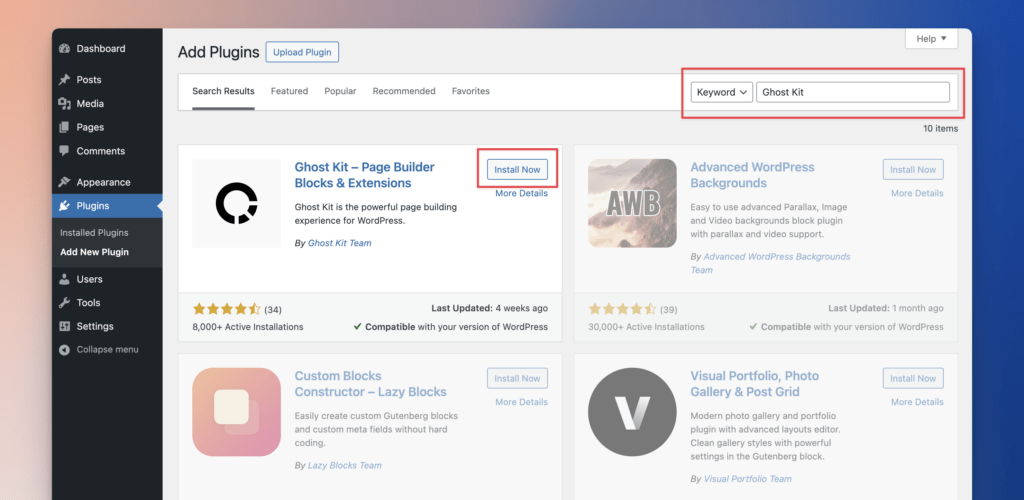
- Go to Admin Menu → Plugins → Add New.
- Enter “Ghost Kit” as a keyword to find it in the list of available plugins. Click on the Install Now button.
Another option is to download the plugin here: https://wordpress.org/plugins/ghostkit/
And then:
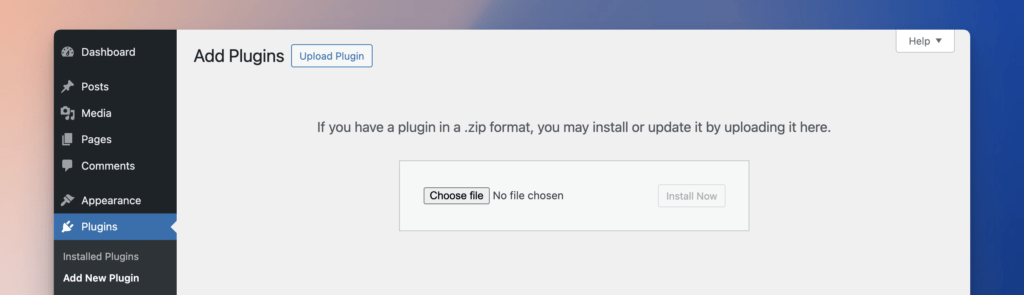
- Go to Admin area → Plugins → Add New.
- Click on the Upload Plugin button.
- Select the downloaded file, and click on the Install Now button.
After installing the plugin, click on the Activate Plugin button, or you can go to Admin area → Plugins and click on the Activate.